
 Română
 Polski
 Deutsch

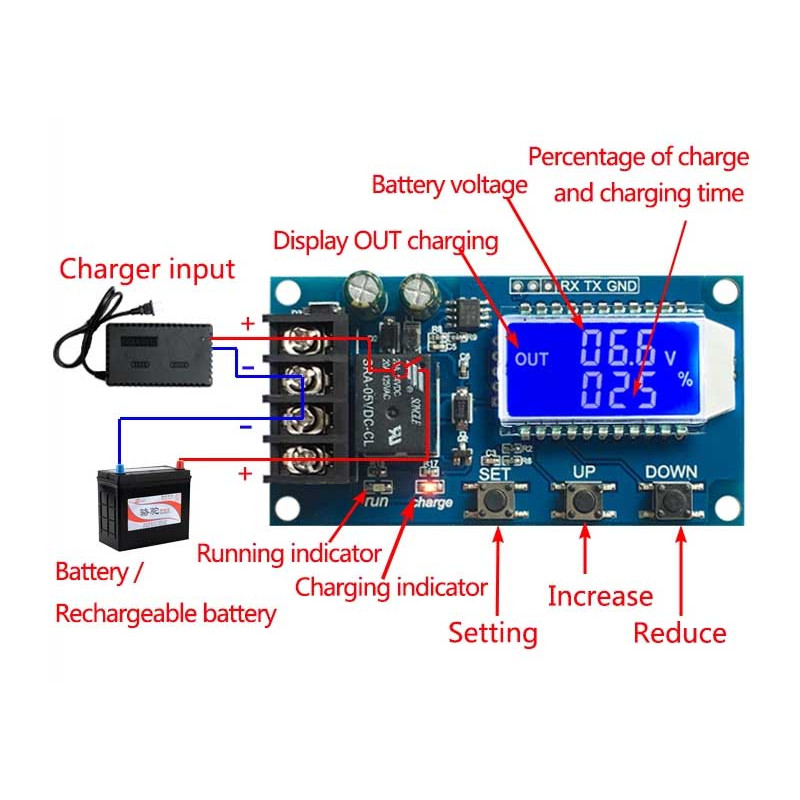

function description
1. Automatic Charge Control Function:
by setting the Volt-Hi: 'up' Volt-li: 'Dn'; When the Battery Voltage is Below the Volt-Li
function description
1. Automatic Charge Control Function:
by setting the Volt-Hi: 'up' Volt-li: 'Dn'; When the Battery Voltage is Below the Volt-Li: 'DN', the related Leads, the Charger Begins to Charge the Battery; When the Battery Voltage Is Up to Volt-Hi: 'Up', the relay is is diconnected and the autoMatic is complete. Once;
2. Charge Time Control Function:
How to Turn on the Time Control Function?
After Entering the parameter set, set the parameter op is non-zero, then turn on the time control, op default parameter is:-:-h, the default not turn on time control;
after the opening time control function (op is non-zero), when the battery voltage is the low-li'dn ', the charger Began to Charge the Battery, The System Began to Clock; During the Timing, The Battery Voltage ≥ Volt-Ha'up ', Disconnect report; If the op time is up, the battery voltage is still the low-li'dn ', the related keeps, Automatically Closes the Charge Time Control Function, and Flashes the H: Er to Remind the User, The Time Parameter Setting Is Unreasonable; Press Any Key to Stop Flashing;
Notes: Time Format: 00:59 (00 for Hours, 59 for Minutes) The Maxim Time is 99:59, Which Is 100 Hours.
XY-L30a Lithium lead-Acid Battery Charge Charging Control Module 6-60V 30a Timer Overcharge Protection Board
3. Serial Data Upload and Parameter Setting Function:
The System Supports Uart Date Upload and Parameter Setting
uart: 115200,8,1
Date Upload Message Format:
Battery Voltage + Battery Percent + Charge Time + Charge Status 12.0v, 020%, 00: 10, op
XY-L30a Lithium lead-Acid Battery Charge Charging Control Module 6-60V 30a Timer Overcharge Protection Board
4.Parameter setting
a) Press and Hold the Set Key to Enter the Setting Interface;
b) switch the parameters you want to set by short press set;
c) after the selection of parameters, can be set by the up/down key to support the short press, long press (Fast had decreed); To set oter parameters, repeat step b, c);
d) after all parameters has set, long press set Key to exit and Save;
5 Key Function Description:
In the Run Interface (Main Interface):
Short Press Set Button to Display the Current Set of Parameters; Short Press Up Button, Toggle Display Charge Percentage and Charging Time;
Short Press Down Button, Select Turn On/Off Very Enabling, if the relay can be closed, will show 'off' as a reminder;
Long Press Up Button, Switch Low Power State
on: no operation in 10 minutes Turn off backlight
off: backlight is always Bright
Long Press Set Button, Enter the Parameter Settings.
calculation of voltage percentage:
Voltage percentage = Battery Voltage/(Volt-Hi-Volt-Li)
6.additional features
a) Charging Time Recording Function: Not Open Charging Time Control, The Product Will Record a Full Time, When the Entry Time Display Interface, Flashing Display Charging Time, and THEN EXIT TIME INTERFACE OR NEXT TON (relay conduction) When Empty;
b) Automatic Parameter Detection: When the Parameters has Set, Exit, IF Volt-Li Dn≥ Volt-Hi, The System Will Flash Display "err" as a reminder;
c) Battery Access Detection: This product Attached to the Battery, IF not Connected to the Battery, The System Will Be Shown in the Downlink "Nbe" as a Reminder